How to Get Architectural Plans of a House Using 3D Tech?

Create Architectural Plans
Try it virtually and show it in 4K
Be sure everything is flawless before launching works
Having 3D software by your side is fundamental for succeeding as an architect. Discover how it can help you deliver flawless designs while making the process effortless and more enjoyable.
Creating architectural plans for a house is a creative endeavor that can be difficult and daunting, especially when you’re trying to visualize how everything will come together. When it comes to developing house plans, architects have traditionally relied on 2D drawings and blueprints. This approach is central to the history of architecture, but it often makes visualization challenging.
But with the advent of modern 3D technology programs, they design houses and structures in a more immersive, accurate, and interactive way. Being able to illustrate, strategize, and streamline the planning process makes it uncomplicated and effortless to produce a final product that checks all the right boxes. In this guide, we’ll explore how this intuitive 3D technology can be used for making intricate and exquisite architectural house plans.
From Blueprint to Reality: How 3D Tech is Transforming Architectural House Plans
3D technology revolutionizes the way architectural house plans are made by allowing architects to create stunningly realistic and immersive 3D models that provide a level of detail and depth that 2D blueprints simply cannot match.
With 3D imagery, architects can envision the complete scope of a structure, including the furniture, fixtures, and other meticulous details. This allows them to make informed decisions about materials and construction methods while improving collaboration and communication with stakeholders.
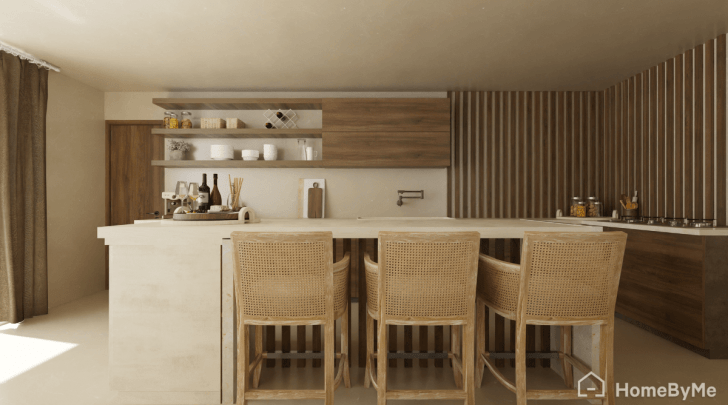
Clients will relish the ability to see their space come to life with a virtual tour of the architect 3D plans. They can virtually walk through all of the bathrooms and bedrooms, the kitchen, the family living space, or anywhere in the design to ensure it’s exactly what they’re looking for.
In addition, 3D models, created with home design software, enable architects to explore different design options and make adjustments on the fly (especially if a client changes their mind). They no longer have to scrap and redraw the entire blueprint. By seeing each detail illustrated as it’s built, potential issues can be anticipated before construction begins. This ensures the project lands within the budget and on schedule, leading to increased efficiency and a more cost-effective process.

A Step-by-Step Guide for Making Architectural Designs, House Plans, and More with 3D Software
Make professional architectural designs
1 Launch a New Project and Build the Floor Plan
Using 3D software like HomeByMe, you’ll need to create a free account and launch a new project. This can be done by clicking the “New Project” button on the homepage. This will take you to the design interface to begin building the floor plan.
2 Add Walls and Rooms and Set the Dimensions
To make architect 3D plans for the house, navigate to the toolbar and select the “Add Wall” button to draw the layout by connecting each exterior and interior wall.
To form the blueprint based on each room, select the “Add room” button and click on the appropriate shapes to use in your floor plan.
When the general floor plan is created, set the dimensions by using the measuring tool to enter the length, width, and height of the house.
Once this is set, start adding doorways, windows, and additional features or technical equipment using the “Build” tab in the toolbar.
Don’t forget the home’s exterior elements. You can also include covered porches, garages, and backyards.
3 Furnish the House
Change from 2D and 3D view modes using the options at the bottom of the screen.
The HomeByMe 3D floor planner provides extensive online collections of furniture options, including chairs, sofas, beds, and tables. Choose the “Furnish” button to browse the materials, features, and brands.
You can use customizable generic products or browse the collection of brand-name items. Use MakeByMe to include custom-built furniture requested by the client.
Select any piece of furniture from the extensive library of items, drag it into the house, and position it where you want it to be.
4 Customize the Interior of the House
To customize the house’s interior decor and give it an authentic, lived-in feeling, use the “Decorate” tool, which allows you to change the color and texture of walls, floors, ceilings, and more.
You can also add lighting fixtures, such as lamps and chandeliers, as well as plants and accessories, to create the desired ambiance.
5 Generate a 3D Model, Share & export your plans
When the house design is finished, you can view and generate a 3D model to examine it from various angles and check out all the components, including the special layout, fixtures, and overall vibe of the interior.
Finally, once you are satisfied with the design, you can export the architectural plans in a variety of formats, including 2D blueprints and 3D models. You can then share the plans with clients, contractors, and other stakeholders to help bring the project to life.

Tips for Creating Accurate and Detailed Architect House Plans
Creating accurate and detailed architect house plans is essential for ensuring that the construction process is successful. Here are some important tips to keep in mind when developing house plans.
Pay Attention to Lighting
When creating a 3D house plan, be sure to pay attention to the lighting. Proper lighting can make a big difference in how the space looks and feels, and 3D modeling is where this can really be enhanced and tailored for your desired ambiance. So use it wisely by employing both natural and artificial lighting in the model to create a realistic and functional space.

Use a Scale
A scale is essential when creating architect house plans. Make sure to use the correct scale, such as ¼ inch to 1 foot, to ensure that your plan is accurate and to scale. Refer back to the measurements to double-check that they are precise.
Focus on the Details
With 3D technology, architects can create incredibly detailed house plans, and it’s important to take advantage of this capability too. Focus on every detail, including textures, finishes, and fixtures. Also, remember to include the locations of less glamorous, but essential features like electrical outlets and plumbing fixtures.
To give your design an added authentic feel, be sure to include furniture and decorative accents such as wall art, mirrors, houseplants, or even pet accessories. This will ensure clients can truly experience their home designs brought to life. HomeByMe’s product catalog includes brand-name products, so a client can easily shop for any item included in the design.

Collaborate with Other Professionals
Architects often collaborate with other professionals, such as engineers, builders, and contractors, to create a final product that is successful and safe. This can also help to identify potential problems while ensuring that the plans meet all the necessary building codes and regulations.
By leveraging the power of 3D technology, architects can create more realistic models of their designs, making it easier for clients and construction teams to visualize the finished structure.

Get Inspired
Whether you’re designing cozy cottages or grand, stately homes, sometimes, even architects and designers need a creative nudge to get going. For example, a client may give you vague instructions. They may ask you to create some designs for a home and only share that they like a Prairie-Style house with contemporary features. And while the iconic Robie House by Frank Lloyd Wright is the epitome of such architecture, your design may need additional inspiration to incorporate the modern features the client is looking for.
Fear not, you can visit HomeByMe’s Inspiration Page; it’s full of designs and ideas from our community around the world. To save you from sifting through thousands of photos and images, you can filter your search by looking specifically by room, style, color, or product brand. Like something you see? Create a mood board by adding it to your collection so you can easily share your ideas with your client before you begin the design process.
You can also visit the HomeByMe Magazine, which is filled with content showcasing the latest news and trends from the world of design. Find handy tips and tricks for decor, as well as articles written for design professionals.
Versatility & Accessibility
We recognize that work isn’t always in the office. Oftentimes, it’s on the go or on-site. Fortunately, HomeByMe is available as a mobile app for iOS and Android devices, so you can tweak designs or access plans no matter where you are.
HomeByMe is an essential tool to create house floor plans, offering complete control over the planning and design process, ultimately helping architects succeed in their profession. By following the tips and techniques outlined above, you can take your designs to the next level, using the wide range of services offered by HomeByMe’s home design software to bring your vision to life.


Create Architectural Plans
Try it virtually and show it in 4K
Be sure everything is flawless before launching works
Make flawless Design plans